
Local action first
Task and incident actions are written to the device database first. The app records local identifiers, timestamps, synchronization status, and status-event history before attempting network delivery.
Disaster response case study
An offline-first coordination platform for volunteers, emergency operations staff, NGOs, and logistics teams working with unstable connectivity and time-critical information.
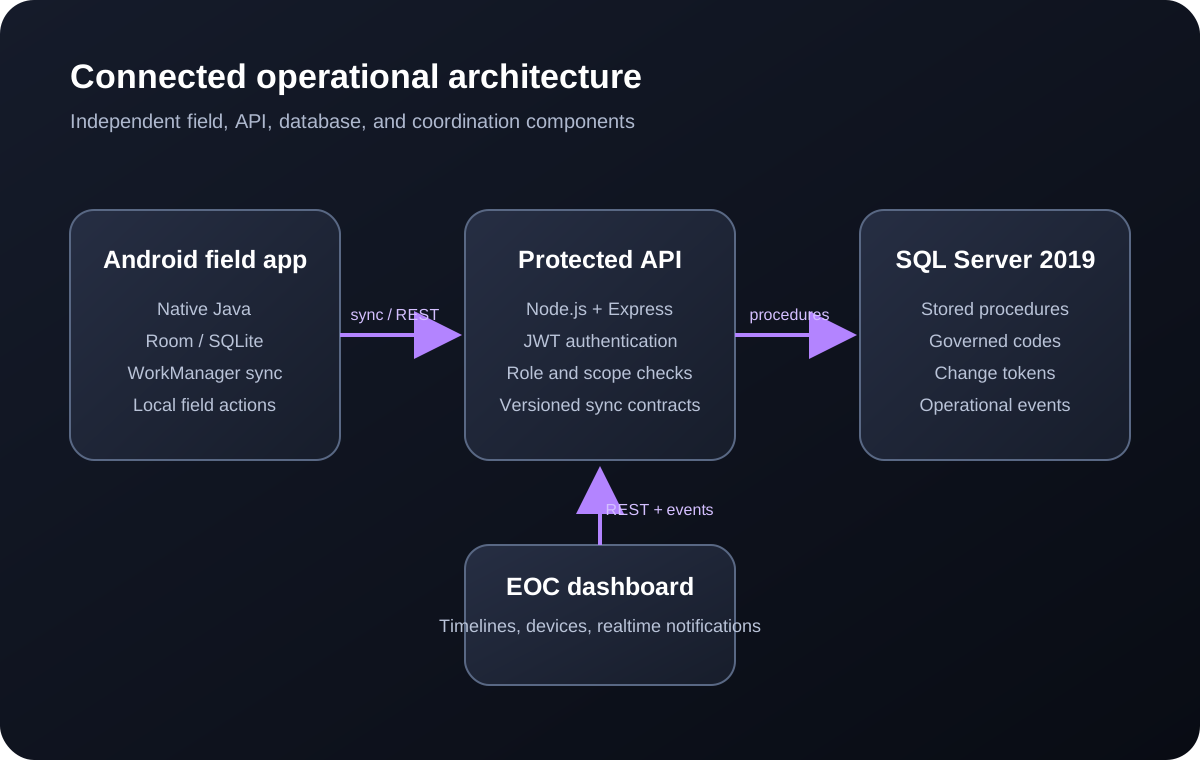
The system connects a native Android field application, a protected Node.js API, a SQL Server operational data store, and a browser-based emergency operations dashboard. Its current verified workflows cover authentication, volunteer profiles, tasks, incidents, person and household needs, device visibility, operational timelines, and controlled offline synchronization.
Operational challenge
Disaster-response coordination cannot assume that every responder has a reliable connection, a powerful device, or time to learn a complicated interface. Teams still need to assign work, report incidents, record changes, and understand what has happened across an operation. If the software stops when the network stops, information is delayed precisely when it is most valuable.
The platform was therefore designed around local-first field actions. A volunteer can work from data stored on the Android device, record a task or incident update locally, and place the change into a synchronization queue. The central system remains authoritative, but field work does not need to wait for a continuous connection.
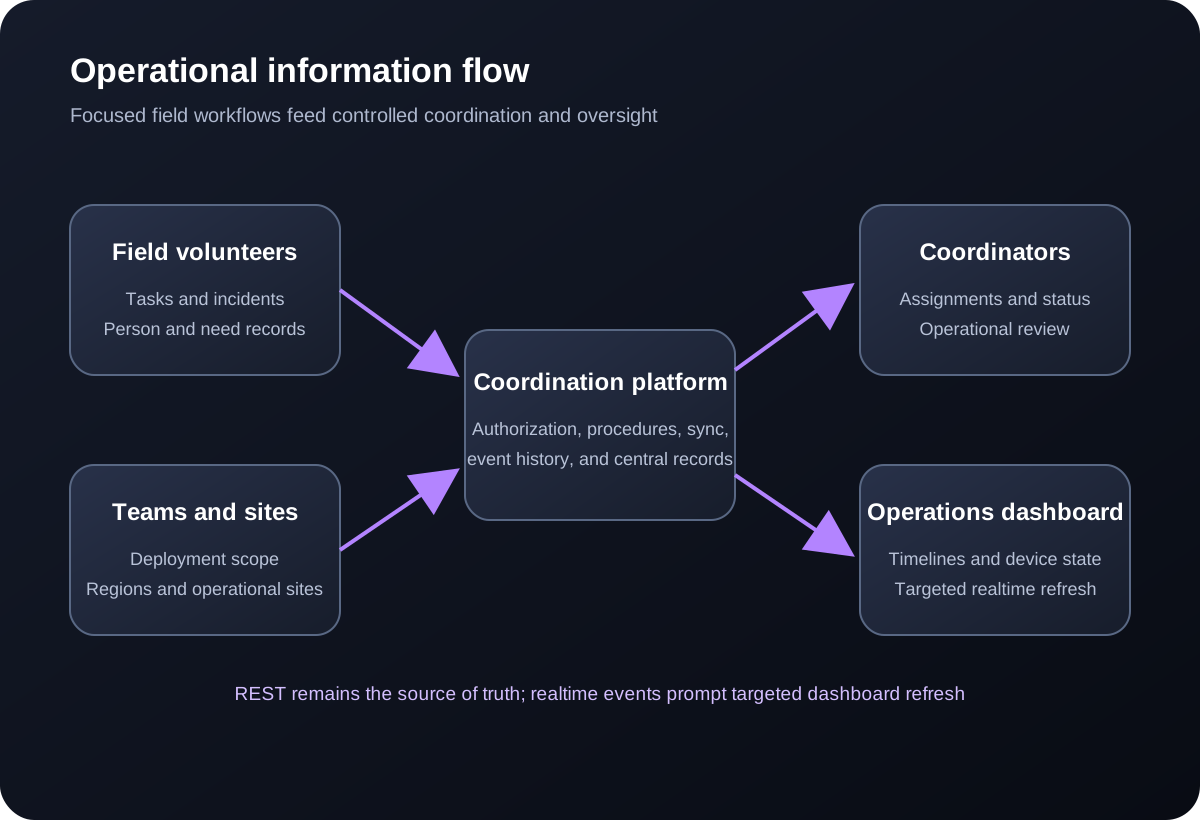
The design also separates operational responsibilities. Field users receive focused mobile workflows, while authorized coordinators and administrators use browser-based views for wider operational awareness. Role checks, team scope, device binding, request validation, and server-derived authorship reduce the risk of trusting uncontrolled client input.
Delivery approach
The mobile interface reads and writes operational data through Room and SQLite. Actions are recorded locally before synchronization is attempted, allowing the interface to reflect field state without waiting for the network.
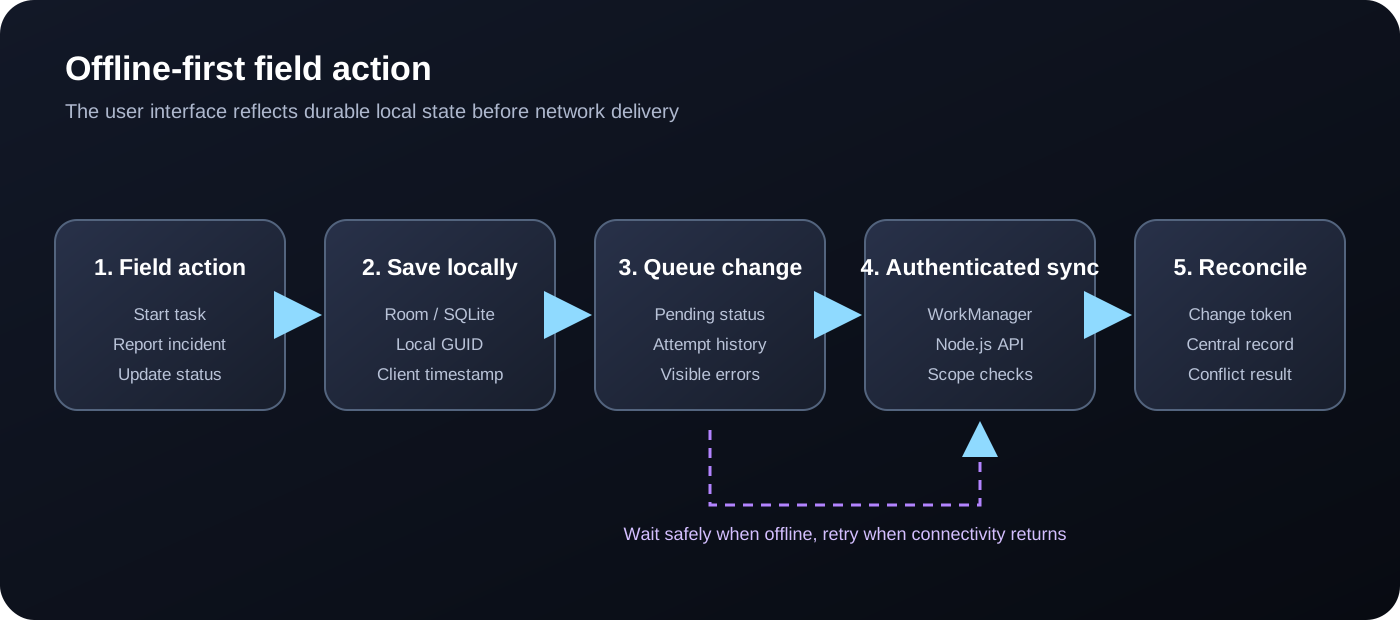
Task and incident actions are written to the device database first. The app records local identifiers, timestamps, synchronization status, and status-event history before attempting network delivery.
WorkManager processes pending operations and exposes pending or failed items through a Sync Status screen. Users can see recorded times, attempts, errors, and retry controls.
Push and pull contracts use change tokens for supported records. Stale task or incident updates can be rejected rather than silently overwriting a newer central change.
Capabilities delivered
The implemented baseline concentrates on the workflows required to coordinate people and understand changing field conditions. Authenticated users can access volunteer context, assigned tasks, incident reporting, and synchronization status. Coordinators receive protected operational views backed by the same central API and database procedures.
Verified technical details
The system is split into separate backend, Android, and admin applications. This keeps field behavior, central business rules, and operational oversight clear while allowing each component to be built and verified independently.
Native Android Java, Room and SQLite, Retrofit and OkHttp, WorkManager-backed synchronization, local status events, and a visible synchronization queue.
Node.js 22 and Express with bcrypt login verification, JWT authentication, request validation, role and scope authorization, device ownership checks, and versioned sync contracts.
SQL Server 2019 with stored procedures as the primary access layer, governed lookup values, row-version change tokens, local GUID support, and event-oriented operational records.
Node.js and EJS administration interface with protected login, operations timelines, device-state visibility, targeted realtime refresh, and REST reconciliation.
Verified outcomes
The platform is still being hardened and is not presented as a completed production deployment with measured humanitarian impact. The outcomes below are engineering results verified during development and deployment testing.
Repeatable smoke checks cover authentication, profiles, task creation and assignment, status changes, incident workflows, synchronization, duplicate replay, and administrative timelines.
The native Android app has passed a clean debug build, installation, launch, login, profile, synchronization, task and incident workflow, and Sync Status checks against the platform API.
Row-version pull and optional push-side conflict tokens are implemented and tested, including rejection of stale task and incident status updates.
The cloud API and admin dashboard have been reached through their reverse proxies, with protected login and operations timeline rendering verified.
Buyer questions
Yes. The Android application is designed around Room-first field actions. Supported task and incident changes are recorded locally and queued for synchronization, allowing users to continue working during connectivity loss. The wider production synchronization engine continues to be hardened.
The central Node.js API and stored-procedure-backed database layer provide clear integration boundaries. A specific integration would begin with a review of the existing platform, identity model, data ownership, workflow rules, and required exchange formats.
The current baseline includes authenticated API access, role and scope checks, request validation, server-derived authorship, device ownership checks, and controlled database procedures. Production deployment would also require an organization-specific security, privacy, retention, and infrastructure review.
The platform is being designed around NIMS-style coordination concepts such as roles, teams, deployments, incidents, regions, sites, and operational status. Exact ICS workflows and terminology should be configured and validated with the responsible emergency-management organization.
Yes. The appropriate approach may be targeted integration, an offline field application, workflow modernization, data-quality improvement, or a new operational module. The first step is to identify the current failure points and the smallest reliable improvement.
Start a conversation
Discuss the operational constraints, current platform, integration requirements, and the smallest dependable path to a working solution.