
Connected streaming
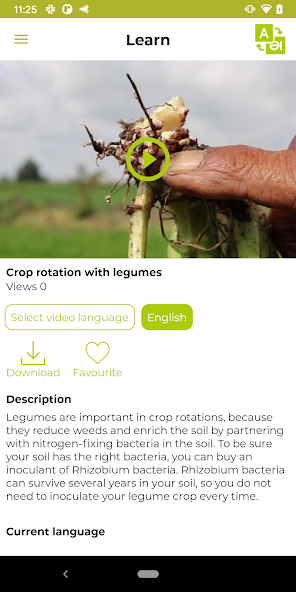
Video details provide a network playback source through the Flutter player, allowing users with a suitable connection to watch immediately without first storing the file.
Cross-platform mobile application case study
Visual Purple built the Flutter mobile application that helps Access Agriculture take practical farmer-to-farmer training videos beyond the website and into the hands of mobile users. The app is deployed through both Google Play and Apple's App Store.
Users can register, browse multilingual agricultural content, stream videos, download protected copies for offline viewing, and transfer downloaded videos directly to another nearby phone without either device needing internet access. Locally recorded activity synchronizes when connectivity returns.
Product challenge
Access Agriculture enables global and local access to quality agricultural training videos in local languages. Its wider platform contains thousands of agroecology videos across more than 100 languages, covering subjects from crops and livestock to equipment, business skills, and sustainable land management. A mobile app must make that depth useful without assuming that every user has continuous or affordable internet access.
The application therefore combines connected discovery with offline continuity. When online, users can retrieve current video listings, stream content, download selected language versions, and access connected services. When offline, locally stored downloads, metadata, thumbnails, favourites, and recently watched records continue to support useful viewing and navigation.
The design goes beyond individual offline access. Downloaded videos can move between nearby phones over a shared Wi-Fi network or one phone's hotspot. The sender exposes the selected local file through a temporary server and displays a QR code. The receiving phone scans the code, downloads the video and its metadata directly, and adds it to its own offline library.
Distribution model
The application supports more than one route from the platform to the learner. Connected users can stream immediately or download a protected copy. Once downloaded, the video remains useful offline and can be passed directly to another phone nearby.
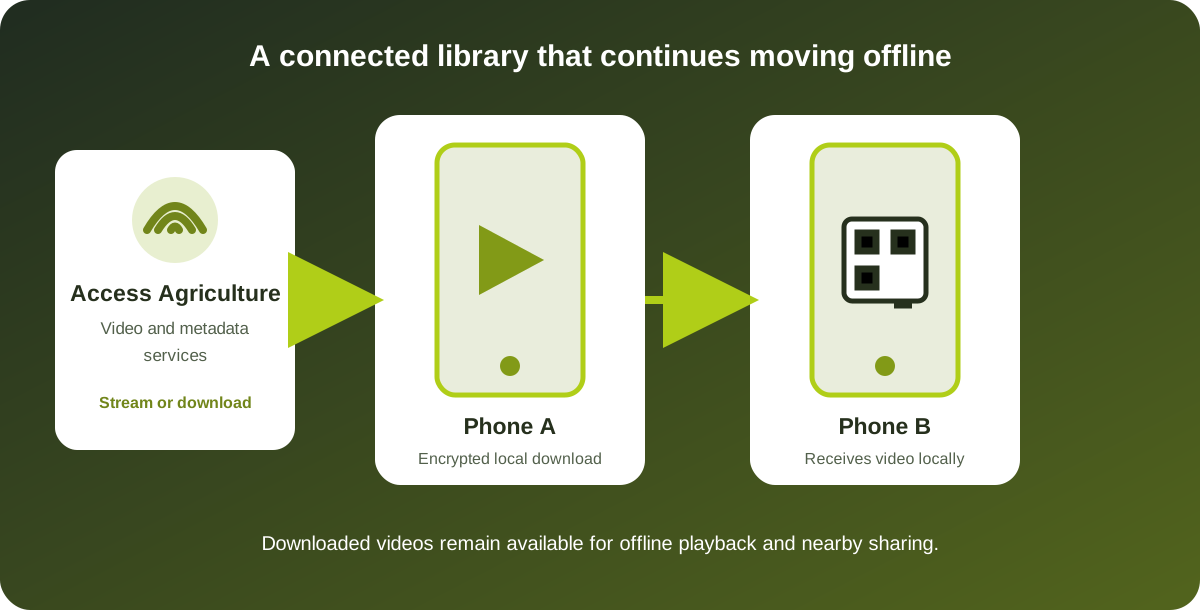
Video details provide a network playback source through the Flutter player, allowing users with a suitable connection to watch immediately without first storing the file.
Selected videos and thumbnails are stored locally. Downloaded encrypted media is prepared on the device for playback and remains available through the user's downloaded-video library.
A downloaded video can be shared over local Wi-Fi or a hotspot. A QR-guided transfer carries both the file and its descriptive metadata to the receiving app.
Discovery experience
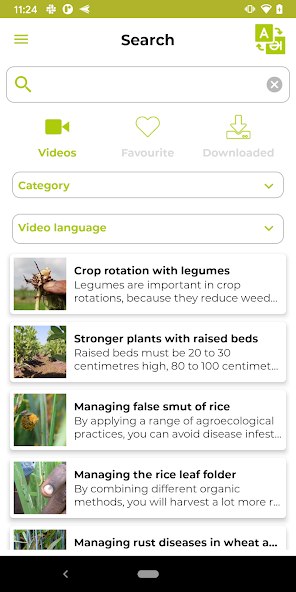
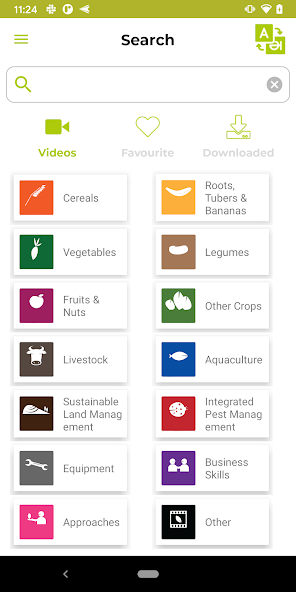
The app supports discovery across a broad and changing library. Users can explore agricultural categories and subcategories, switch the selected video language, search titles, and open detailed records containing descriptions, categories, available translations, thumbnails, and playback controls.
Search extends across the main library, favourites, and downloaded videos. This matters after content has been stored locally: a user should not have to return online simply to find a video already held on the phone. Favourites and recently watched records provide additional routes back to useful material.
The interface itself is multilingual and supports right-to-left presentation where required. An optional Audible Mode downloads a language-specific guidance pack and plays voice feedback for interface actions, supporting users who benefit from spoken navigation. Dark mode, account deletion, device information, language selection, and update handling are available through settings and supporting flows.
Registration and access
The registration flow is designed around the mobile installation rather than a conventional email-and-password account. It captures selected profile context such as country, organization type, year of birth, and gender, associates the registration with a device identifier, and retrieves the key material needed for protected content handling.
This provides Access Agriculture with an identifiable deployment while keeping entry practical for the intended audience. The app caches language, category, interface, and video-list information so useful navigation can continue when the network is unavailable. Connected heartbeat, update, and user-detail flows help maintain the wider deployment over time.
The app also includes Ask Agi, a connected conversational feature for agricultural guidance. It complements the curated video library without replacing the offline workflows that remain essential when connectivity is absent.
Operational insight
Programme insight is useful, but collecting it must not prevent the application from working offline. The implementation records supported activity locally first and attempts synchronization when the app has connectivity.
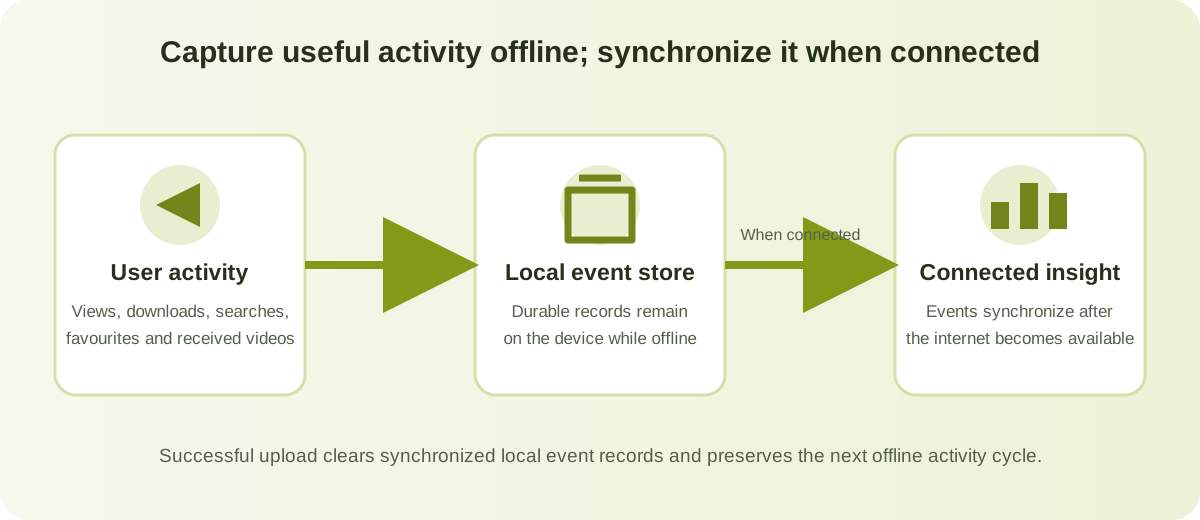
SQLite records video views, downloads, favourite changes, search terms, and videos received from another device, including dates and sender-device context where applicable.
Events are transformed into uniquely identified activity records and posted with device and installation context when a connection is available.
Successfully synchronized event records are cleared locally after the server accepts them, allowing the next offline activity cycle to begin cleanly.
Verified technical details
The details below are drawn from the working Flutter repository, platform projects, official store listings, and implemented application flows.
Flutter and Dart provide a shared application codebase, with native Android and iOS projects for store deployment, permissions, platform configuration, and device integration.
SQLite, application document storage, shared preferences, cached metadata, and downloaded thumbnails support favourites, downloads, recent viewing, offline lists, and pending activity.
Better Player supports network and local playback. Protected downloads are stored encrypted and prepared on-device using retrieved device-associated key material.
The sender uses an embedded Shelf HTTP server and QR code. The receiver scans the local URL, streams the file into application storage, and registers the received video locally.
Delivered capability
The published Android app has exceeded 10,000 downloads, and the product is available on both major mobile platforms. The outcomes below describe implemented product capability rather than claiming independently measured agricultural impact.
View the live listings on Google Play and Apple's App Store.
A shared Flutter product is deployed for Android and iOS while retaining platform-specific integration where required.
Downloaded videos, thumbnails, metadata, favourites, and recent activity remain useful without a live connection.
One connected download can be transferred to another nearby phone without consuming internet data on either device during sharing.
Operational activity can be captured during offline use and synchronized after connectivity returns.
Buyer questions
Yes. Users can download protected videos and their supporting information while connected, then find and watch those videos from the local downloaded library when offline.
The phones connect through the same local Wi-Fi network or one phone's hotspot. The sending app starts a temporary local server and displays a QR code. The receiving app scans the code and downloads the selected video directly from the nearby phone.
The implemented local event store covers views, downloads, favourite changes, search terms, and received-video events. These records are submitted with device and timing context and cleared locally after successful synchronization.
The interface supports multiple languages and right-to-left presentation where required. Users can enable dark mode and an optional Audible Mode that downloads spoken interface guidance for the selected language when available.
Yes. An engagement can cover cross-platform delivery, media streaming, protected offline storage, local sharing, multilingual interfaces, delayed synchronization, or modernization of an existing mobile application and backend.
Start a conversation
Discuss your content, users, connectivity constraints, protection requirements, distribution model, and the practical route to a dependable cross-platform application.